Section 01 What Is Web Scraping & How Does It Work?
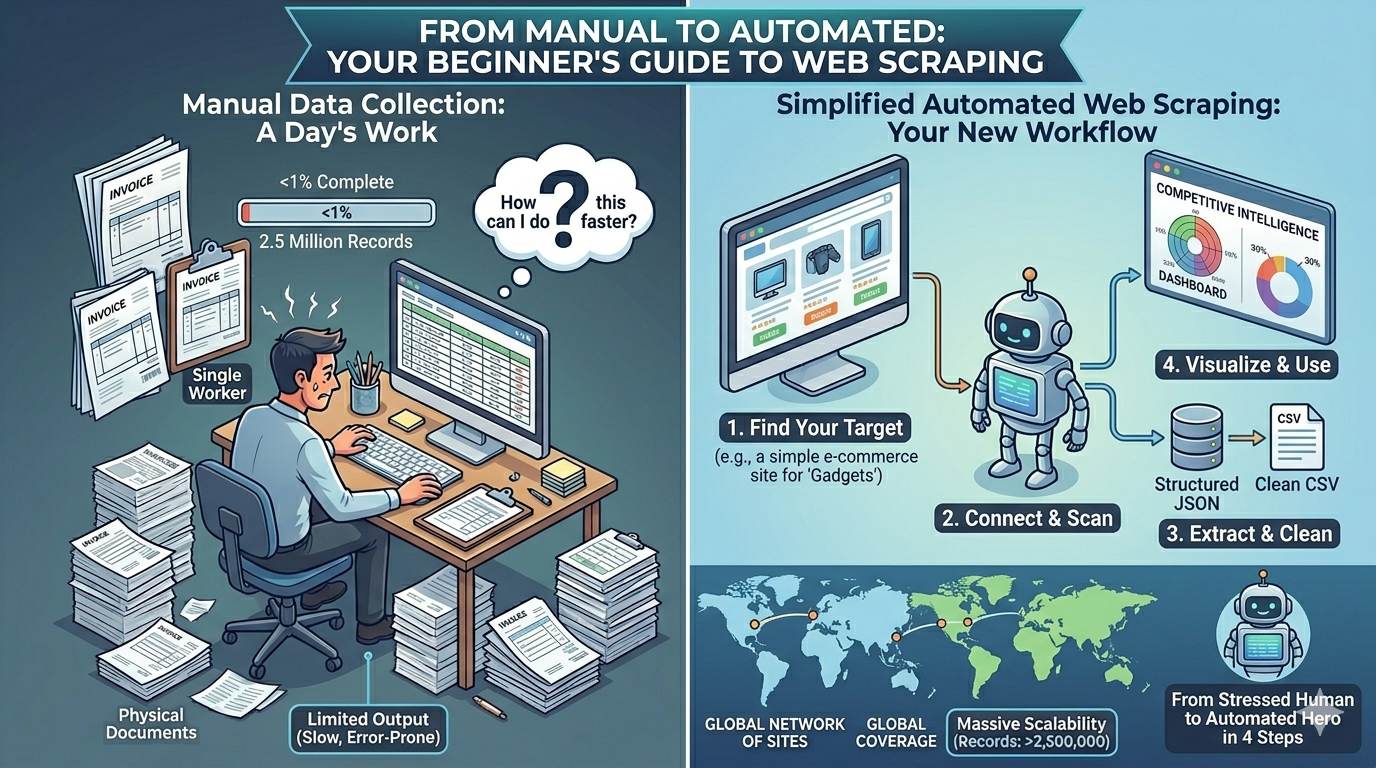
Let’s start with the basics. Web scraping — also called web data extraction or web harvesting — is the automated process of collecting specific information from websites. Instead of manually opening web pages, reading through them, and copying data into a spreadsheet, a web scraper does all of this automatically, much faster, and far more accurately.
Think of it this way. When you visit a website, your browser makes a request to the site’s server, receives a response in the form of HTML code, and then visually renders that code into the webpage you see. Web scraping works the same way — except instead of a browser rendering the page for a human to read, a program parses the HTML and extracts only the specific data you’ve told it to collect.
The collected data can then be organized, cleaned, and exported in a structured format — most commonly CSV, JSON, or Excel — ready for analysis, import into databases, or use in business applications.
Simple Analogy: Imagine hiring someone to visit 1,000 online stores, write down the name, price, and description of every product, and give you the results in a spreadsheet. Web scraping does exactly that — except it visits 1,000 stores simultaneously, takes seconds instead of weeks, and never makes a single transcription error.
Section 02 Why Do Businesses Scrape Data from Websites?
People and businesses scrape data from websites for an enormous range of purposes. Here are the most common and commercially valuable use cases you’ll encounter:
E-Commerce price monitoring & competitor tracking
Real estate listing aggregation & market analysis
Market research & competitive intelligence gathering
News monitoring & brand sentiment tracking
Beyond these headline use cases, businesses also use web scraping for lead generation (extracting business contact information), financial data collection (stock prices, economic indicators), academic research, SEO analysis (tracking keyword rankings and competitor content), and product catalog management (populating online stores with manufacturer data).
The common thread across all of these applications is this: there is valuable data publicly available on the web, and web scraping is the most efficient, accurate, and scalable way to collect it. At MyDataScraper, we build custom solutions for each of these use cases — delivering exactly the data you need, in the format you prefer.
Section 03 How Websites Store Data (What You’re Actually Scraping)
To understand web scraping, it helps to understand how websites actually work. Every web page is built from three core technologies:
- HTML (HyperText Markup Language): The structure and content of a page — the actual text, links, images, and data organized into tags and elements. This is the primary target of most web scrapers.
- CSS (Cascading Style Sheets): Controls the visual appearance of a page — fonts, colors, layout. CSS selectors are often used by scrapers to identify and target specific data elements.
- JavaScript: Adds dynamic behavior to pages — loading content after the initial page load, powering infinite scroll, handling user interactions. Modern scrapers need to handle JavaScript rendering to access dynamically loaded content.
When you right-click on any web page and select “View Page Source,” you see the raw HTML — the same thing a web scraper sees. The scraper’s job is to navigate this HTML structure, find the elements containing your target data, and extract their content.
Heads Up: Modern websites increasingly use JavaScript to load content dynamically — meaning the data you want isn’t present in the initial HTML response but loads after the page renders. This is one of the key technical challenges that professional scrapers like MyDataScraper are specifically built to handle.
Section 04 Web Scraping Methods & Techniques Explained
There are several distinct approaches to scraping data from websites, each with different technical requirements, capabilities, and ideal use cases. Here’s a clear breakdown:
The most basic “scraping” method — a human manually visits web pages and copies data into a spreadsheet. Technically requires zero skill. Practically, it is painfully slow, highly error-prone, and completely unscalable. Suitable for collecting a handful of data points on a one-time basis only.
Best for: Collecting fewer than 50 data points, one time only. Anything beyond that demands a better approach.
Browser extensions like Web Scraper (Chrome) allow non-technical users to define scraping rules through a visual interface and extract data from pages they navigate to manually. No coding required, but limited in scale and automation capability.
Best for: Beginners wanting to scrape small datasets from simple websites without writing any code. Not suitable for large-scale or scheduled automated collection.
Cloud-based tools like Octoparse, ParseHub, and Import.io offer visual point-and-click interfaces for building scrapers without coding. They handle scheduling, pagination, and basic data cleaning. Good for moderate-scale projects on simpler websites.
Best for: Small to medium projects on relatively simple websites. Struggles with complex anti-bot measures, heavy JavaScript rendering, and very large data volumes.
Writing custom scraping scripts using Python libraries like BeautifulSoup (HTML parsing), Scrapy (full scraping framework), and Selenium or Playwright (browser automation for JavaScript-heavy sites). Highly flexible and powerful — but requires coding knowledge and significant time investment to build and maintain.
Best for: Developers and technical users who need custom solutions and have the Python knowledge to build and maintain them. Requires ongoing maintenance as target websites change.
Some websites provide official APIs (Application Programming Interfaces) that allow structured data access. When available, APIs are the cleanest and most reliable data collection method. However, most websites don’t offer APIs, and those that do often limit the data accessible or charge premium rates for comprehensive access.
Best for: When the target website offers a public API with the data you need. Often combined with web scraping for sources without APIs.
Partnering with a professional data extraction service like MyDataScraper to build, manage, and maintain custom scrapers on your behalf. You specify what data you need and how you want it delivered — the technical team handles everything else. This approach combines the power and customization of custom-built scrapers with zero technical burden on the client.
Best for: Businesses of any size that need reliable, large-scale data collection without investing in technical infrastructure or developer time. The most cost-effective solution for ongoing data needs.
Section 05 Best Web Scraping Tools in 2025: A Beginner’s Comparison
Octoparse
BeginnerA popular no-code scraping platform with a visual point-and-click interface. Handles pagination, login forms, and basic scheduling. Cloud-based option available for running scrapers without your computer being on.
✅ Pros
- No coding required
- Visual interface
- Cloud scheduling
❌ Cons
- Limited at scale
- Struggles with complex sites
- Monthly subscription cost
ParseHub
BeginnerDesktop and cloud-based scraping tool with a visual interface that handles JavaScript-rendered pages. Good for moderate complexity sites. Free plan available with limitations on projects and data volume.
✅ Pros
- Handles JavaScript
- Free tier available
- Easy to learn
❌ Cons
- Slow on large projects
- Limited free plan
- Not for enterprise scale
BeautifulSoup + Python
IntermediatePython library for parsing HTML and XML documents. Combined with the Requests library, it’s one of the most widely used scraping approaches for static web pages. Requires Python knowledge but is highly flexible and free.
✅ Pros
- Free and open source
- Very flexible
- Large community
❌ Cons
- Requires Python skills
- No JavaScript support
- Needs maintenance
Scrapy Framework
AdvancedA powerful, open-source Python web scraping framework designed for large-scale scraping projects. Highly efficient, supports concurrent requests, and has extensive middleware for handling complex scraping scenarios. Best for experienced developers.
✅ Pros
- Extremely fast at scale
- Highly customizable
- Production ready
❌ Cons
- Steep learning curve
- Developer expertise needed
- Complex setup
Selenium / Playwright
AdvancedBrowser automation tools that control a real browser programmatically — perfect for scraping JavaScript-heavy, dynamically loaded websites. Playwright (newer) is faster and more reliable than Selenium for modern web applications.
✅ Pros
- Handles any JS site
- Mimics real user behavior
- Very powerful
❌ Cons
- Slower than HTML parsing
- Heavy resource usage
- Requires coding expertise
MyDataScraper (Professional Service)
Best for BusinessCustom-built web scraping solutions designed, deployed, and maintained by an expert team. Handles any website complexity, any scale, any data format. You get clean data delivered automatically — no technical knowledge required.
✅ Pros
- Zero technical burden
- Any scale & complexity
- Fully managed service
❌ Cons
- Not DIY
- Setup takes 3-7 days
- —
Section 06 Step-by-Step: How to Scrape Data from a Website
Whether you’re using a tool, writing code, or working with a professional service, the fundamental process of scraping data from any website follows the same core steps. Here’s the complete workflow:
-
Define Your Data Requirements
Before touching any tool or code, get crystal clear on exactly what data you need. Which websites? Which specific pages? What data fields — product names, prices, URLs, descriptions, images, contact details, reviews? What’s the volume? How often do you need it refreshed? Clarity here saves enormous time later.
-
Inspect the Target Website Structure
Open your target website in Chrome, right-click on the data you want, and select “Inspect Element.” This opens the browser’s developer tools and shows you the HTML structure around your target data — the element types, CSS classes, and attributes you’ll use to target the right information in your scraper.
-
Choose Your Scraping Method or Tool
Based on your technical skill level, data volume needs, and website complexity — select the appropriate approach. For non-technical users with moderate needs: a no-code platform. For large-scale or complex projects: custom development or a professional service like MyDataScraper.
-
Build and Configure Your Scraper
Set up your scraper to target the specific HTML elements containing your data. Configure pagination handling (to navigate through multiple pages), set appropriate request delays to avoid overloading servers, and handle any login requirements or cookie management needed to access the target pages.
-
Test on a Small Sample First
Always test your scraper on a small subset of pages before running it at full scale. Check that the extracted data is accurate, complete, and correctly formatted. Identify any edge cases — pages with missing fields, different layouts, or unusual content — and handle them before scaling up.
-
Run at Scale and Monitor Performance
Once tested, run your scraper at full scale across all target pages. Monitor for errors, blocked requests, rate limiting responses, and data quality issues. Implement error handling and retry logic for failed requests to ensure complete data collection.
-
Clean, Validate & Deduplicate Your Data
Raw scraped data needs cleaning. Remove duplicates, standardize formats (date formats, currency symbols, units of measurement), fill missing values where possible, and validate data types. This step is critical for ensuring your extracted data is actually usable for analysis.
-
Export in Your Preferred Format
Export your clean, structured data in the format that works for your workflow — CSV for spreadsheet analysis, JSON for API integration and developer workflows, or Excel for business reporting and executive dashboards.
-
Schedule for Ongoing Automated Collection
If you need data regularly, set up automated scheduling so your scraper runs on your required frequency — daily, hourly, or in real-time — and delivers fresh data to your inbox, database, or storage automatically. This is where manual research is fully replaced by a continuous intelligence pipeline.
Section 07 Getting Your Data in CSV, JSON, or Excel
One of the most important decisions in any web scraping project is choosing the right output format for your data. Here’s a clear guide to the three most common formats and when to use each:
| Format | Best For | Compatible With | Ideal User |
|---|---|---|---|
| 📄 CSV | Simple tabular data, large datasets, database imports | Excel, Google Sheets, SQL databases, Python, R | Data analysts, database administrators |
| 🔧 JSON | Nested data structures, API responses, web apps | JavaScript, Python, REST APIs, MongoDB, Node.js | Developers, software engineers, API integrations |
| 📊 Excel | Business reports, dashboards, presentations | Microsoft Excel, Google Sheets, Power BI, Tableau | Business users, executives, marketing teams |
At MyDataScraper, we deliver your extracted data in whichever format best suits your workflow — CSV, JSON, or Excel. We can also push data directly to your database, cloud storage (AWS S3, Google Drive, Dropbox), or integrate via API to your existing business systems and BI platforms.
Section 08 Web Scraping Do’s and Don’ts
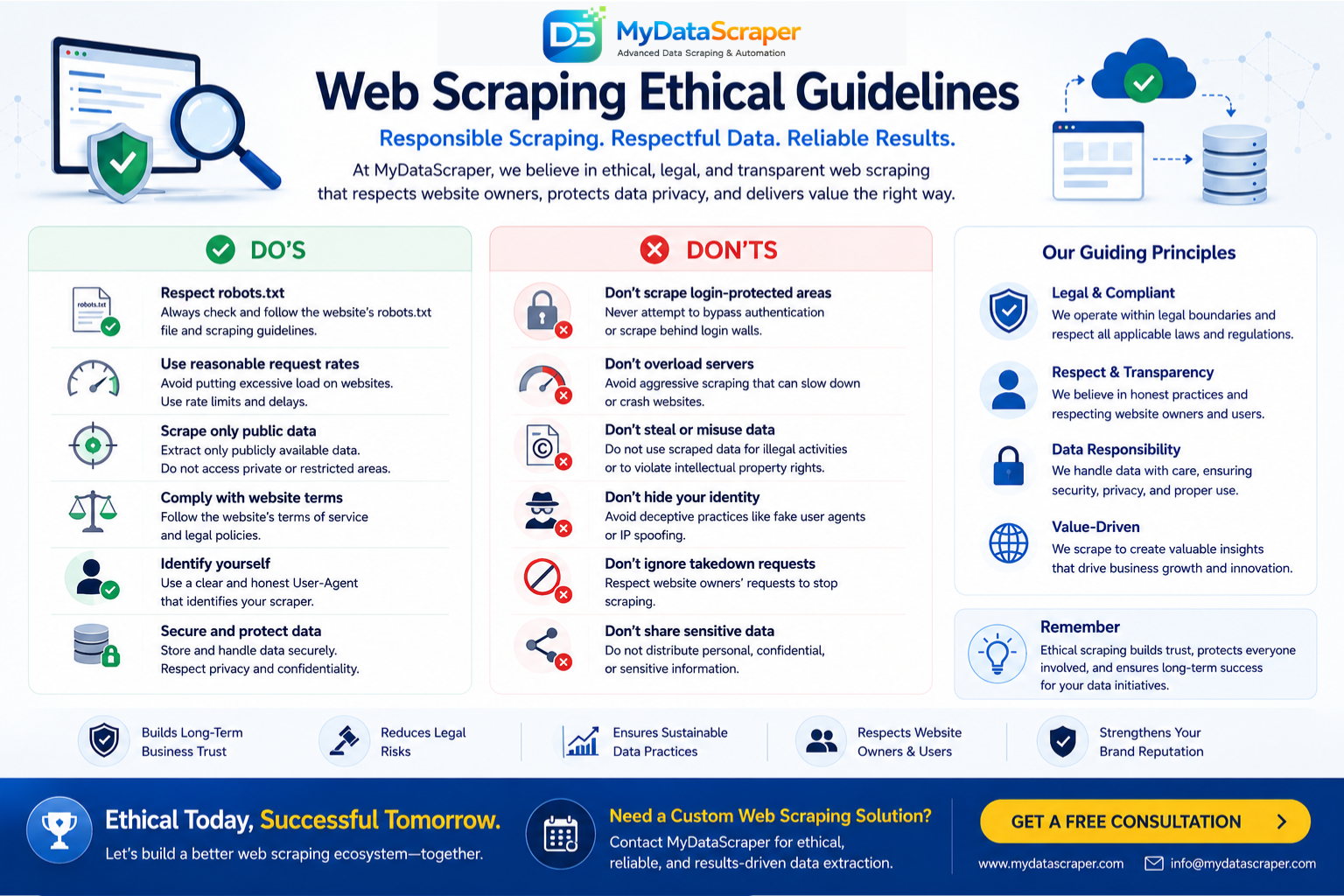
Web scraping, like any powerful capability, comes with responsibilities. Follow these principles to scrape ethically, legally, and effectively:
✅ DO These Things
- Always scrape publicly available data only
- Read and respect the website’s robots.txt file
- Review the site’s Terms of Service before scraping
- Implement proper rate limiting and request delays
- Identify your scraper with an honest user-agent string
- Scrape during off-peak hours to minimize server impact
- Use data for legitimate business intelligence purposes
- Comply with GDPR, CCPA, and applicable privacy laws
- Handle and store extracted data securely
- Work with professionals for complex or sensitive projects
❌ DON’T Do These Things
- Scrape content behind login walls without permission
- Collect personal data without legitimate legal basis
- Ignore Disallow directives in robots.txt
- Send requests so fast you impact site performance
- Bypass CAPTCHAs or explicit anti-scraping measures aggressively
- Republish scraped copyrighted content as your own
- Use scraped data for spam, fraud, or harassment
- Scrape sensitive personal information
- Ignore changes in Terms of Service over time
- Use deceptive methods to misrepresent your scraper’s identity
The Golden Rule of Web Scraping: If the data is publicly visible on the web and you’re using it for legitimate business intelligence purposes while respecting the site’s infrastructure and terms, you’re on solid ethical ground. When in doubt, consult a legal professional — and consider working with a trusted professional scraping service like MyDataScraper that builds compliance into every project.
Section 09 Common Web Scraping Challenges & How to Overcome Them
Even experienced scrapers encounter obstacles. Here are the most common challenges you’ll face when scraping data from websites — and how professionals handle them:
Challenge 1: Anti-Bot Detection & IP Blocking
Many websites detect and block automated scrapers using techniques like rate limiting, IP blocking, browser fingerprinting, and behavioral analysis. Solution: Use rotating proxy pools, implement human-like request timing, rotate user-agent strings, and use browser automation tools that mimic real user behavior.
Challenge 2: JavaScript-Rendered Dynamic Content
Increasingly, website content loads dynamically via JavaScript after the initial page load — meaning a basic HTML parser won’t see it at all. Solution: Use headless browser tools like Playwright or Selenium that fully render JavaScript before extracting data, just as a real browser would.
Challenge 3: CAPTCHA Challenges
CAPTCHAs are specifically designed to distinguish human users from bots. Solution: CAPTCHA-solving services, browser automation that mimics human-like interaction patterns, and strategic rate limiting to avoid triggering CAPTCHA challenges in the first place.
Challenge 4: Frequently Changing Website Structures
Websites regularly update their design and HTML structure — breaking scrapers that relied on specific element selectors. Solution: Build resilient scrapers with multiple fallback selectors, implement monitoring alerts for scraper failures, and maintain scrapers proactively. This is a key reason why businesses choose managed scraping services over DIY tools.
Challenge 5: Pagination & Infinite Scroll
Data is often spread across hundreds of paginated pages or behind infinite scroll interfaces. Solution: Implement pagination logic that automatically navigates through all pages, or use browser automation to trigger infinite scroll loading and capture all content.
Pro Tip: All of these challenges are routinely solved by professional web scraping teams. If you’re spending more time fighting technical obstacles than analyzing the data you’ve collected, it’s a strong signal that partnering with a professional service like MyDataScraper will save you significant time and deliver far better results. Contact us to discuss your project.
How a Market Research Startup Went from 2 Weeks to 2 Hours of Data Collection
A fast-growing market research startup was drowning in manual data collection. Their small team of analysts was spending the first two weeks of every month collecting competitive pricing data, product feature comparisons, and consumer review sentiment across their clients’ industries — leaving only the final week for actual analysis and report creation.
The founder tried to solve it with Python scripts, but maintaining them as websites changed was a constant battle that pulled developer resources away from product development. They tried Octoparse for simpler sites, but it couldn’t handle the JavaScript-heavy platforms their clients cared about most.
After partnering with MyDataScraper, we built a comprehensive automated data pipeline covering 12 industry-specific data sources across their top 8 client sectors. Data was automatically collected, cleaned, and delivered in structured Excel reports every Monday morning — before the team arrived at work.
What changed immediately:
- Data collection time dropped from 2 weeks to under 2 hours of review
- Coverage expanded from 3 sources to 12 sources per client sector
- Data freshness improved from monthly to weekly for all clients
- Report turnaround reduced from 4 weeks to 8 days
- Developer time fully redirected to product development
Reduction in manual data collection hours per month
More data sources monitored with no additional team
Faster client report delivery — from 4 weeks to 8 days
New enterprise clients won specifically on data capability
Stop Struggling with Data Collection.
Let Us Handle It.
Whether you’re a complete beginner or an experienced analyst, MyDataScraper builds the custom web scraping solution you need — delivering clean, structured data in CSV, JSON, or Excel. No technical skills required. No infrastructure to manage. Just the data you need, delivered automatically.
🚀 Get Your Free Consultation Or learn more at www.mydatascraper.comSection 10 When to DIY vs When to Hire a Professional Scraping Service
One of the most practical questions beginners ask is: “Should I try to do this myself, or hire someone?” Here’s an honest guide to help you make the right decision:
| Situation | DIY Approach | Professional Service |
|---|---|---|
| Data volume needed | Small (under 5,000 records) | Medium to large (5,000+ records) |
| Technical skill level | Comfortable with Python or no-code tools | Non-technical or time-constrained |
| Website complexity | Simple static websites | JavaScript-heavy, anti-bot protected sites |
| Frequency of collection | One-time or infrequent | Ongoing, scheduled, automated |
| Time available | Willing to invest setup and maintenance time | Want data quickly without technical investment |
| Data accuracy requirements | Tolerant of some errors | Need consistently high-quality, clean data |
| Business criticality | Experimental or low-stakes research | Drives pricing, strategy, or operational decisions |
“The question isn’t whether you can do it yourself — it’s whether spending your time and energy building and maintaining scrapers is the highest-value use of your resources. For most businesses, the answer is a clear no.” — MyDataScraper, Data Extraction Specialists
If your situation falls into the “Professional Service” column more often than not, reach out to MyDataScraper today. We offer a free consultation where we’ll assess your data needs, explain exactly how we’d approach your project, and give you a transparent quote — with no obligation.
Section 11 Frequently Asked Questions
Is web scraping legal?
Scraping publicly available data is generally legal in most jurisdictions. Key court cases (including hiQ v. LinkedIn) have upheld the right to scrape public data. However, legality depends on what data you collect, how you use it, and which website’s terms of service apply. Always review terms of service, respect robots.txt, and comply with data privacy laws like GDPR and CCPA. When in doubt, consult a legal professional or work with an experienced service like MyDataScraper that builds compliance into every project.
Can I scrape data from any website without coding?
Yes — for simpler websites, no-code tools like Octoparse and ParseHub allow data extraction without writing code. However, for complex websites (heavy JavaScript, anti-bot measures, login requirements, large scale), professional services like MyDataScraper provide the most reliable solution — with zero technical requirements on your part.
How long does it take to scrape a website?
Timing depends entirely on the scale of your project. A small scrape of a few hundred pages might complete in minutes. A large-scale project covering millions of pages might run continuously. Professional services are configured to match your data freshness requirements — from real-time to daily to weekly — ensuring data arrives exactly when you need it.
What data formats can scraped data be delivered in?
The most common formats are CSV (great for spreadsheets and databases), JSON (ideal for developers and API integrations), and Excel (perfect for business reporting). At MyDataScraper, we deliver in whichever format you prefer and can also integrate directly with your databases, cloud storage, CRM, or BI platforms.
Will web scraping slow down or damage the target website?
Irresponsible scraping that sends thousands of requests per second could impact a website’s performance. Responsible, professional scraping implements strict rate limiting, appropriate request delays, and off-peak scheduling to ensure zero negative impact on target servers. MyDataScraper builds proper rate limiting and ethical scraping practices into every project as standard.
How much does professional web scraping cost?
Professional web scraping costs vary based on website complexity, data volume, collection frequency, and delivery requirements. For most businesses, it costs significantly less than the equivalent manual research operation — often saving thousands of dollars per month. Contact MyDataScraper for a free custom quote tailored to your specific project needs.
Can web scraping handle websites that require login?
Technical solutions exist for scraping content behind login pages — including session management and cookie handling. However, doing so often violates website terms of service. At MyDataScraper, we focus exclusively on publicly accessible data and advise clients on the boundaries of ethical and legal data collection for each specific use case.
Conclusion Your Web Scraping Journey Starts Here
Web scraping is one of the most powerful and practical skills — or capabilities — a business or individual can develop in 2025. The ability to systematically collect, organize, and act on data from the open web gives you a genuine intelligence advantage in virtually every domain: pricing strategy, market research, competitive intelligence, lead generation, real estate investment, and far more.
As this guide has shown, the path from “I want to scrape data” to “I have clean, structured data delivered automatically” is clearer than most beginners expect. Whether you choose a no-code tool for simple projects, learn Python for more control, or partner with a professional service for complex, ongoing, and business-critical data needs — the technology and expertise to get the data you need is readily available.
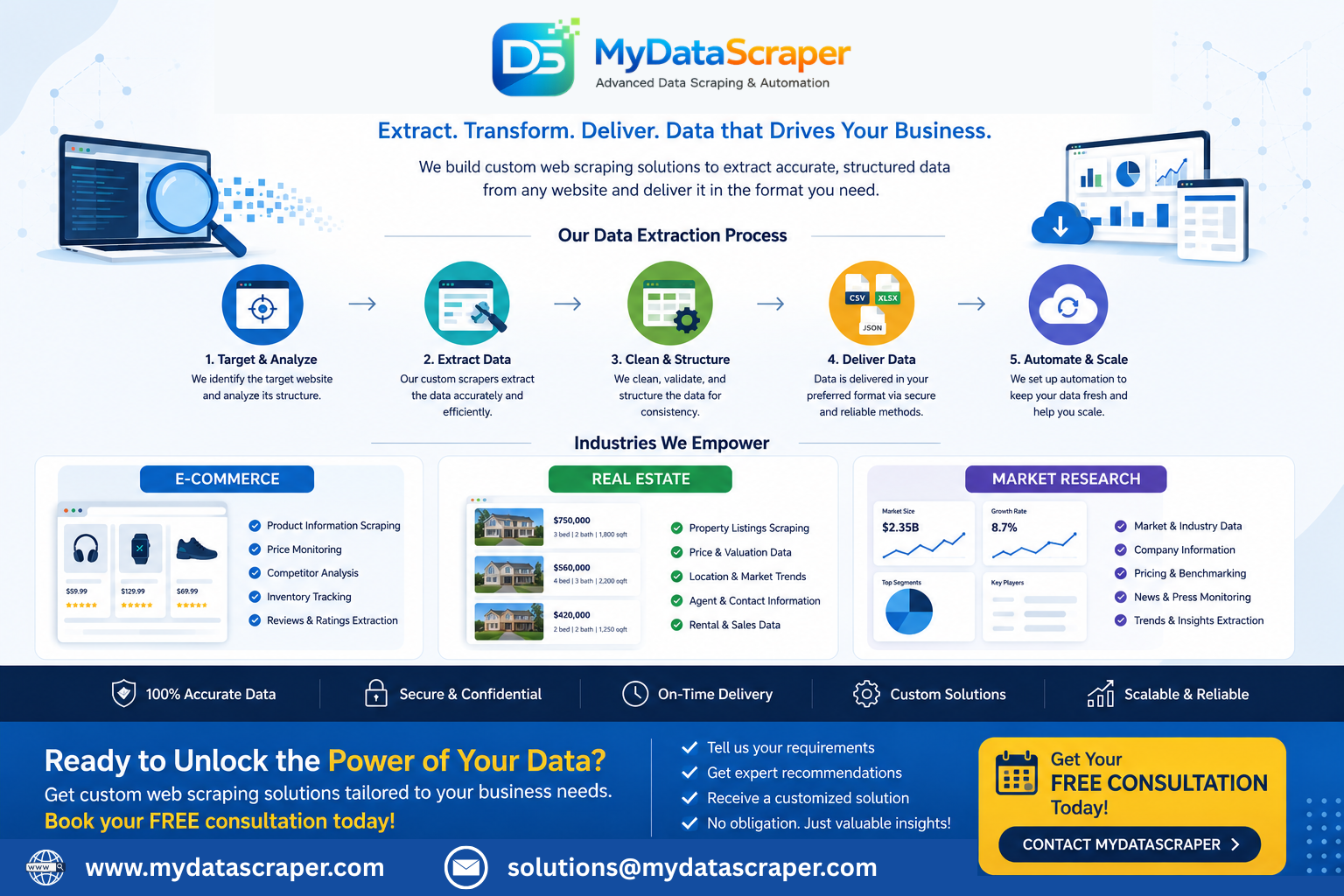
At MyDataScraper, we’ve helped businesses at every stage of this journey — from first-time scrapers who need a simple one-time data extraction to enterprise organizations running continuous multi-source intelligence pipelines. We provide custom, scalable web scraping solutions for e-commerce, real estate, market research, and beyond — with data delivered in CSV, JSON, or Excel on any schedule you need.
Your data is out there, publicly available on the web, waiting to be collected and turned into competitive advantage. The only question is: are you going to go get it?
Get Your Custom Web Scraping Solution Today
Tell us what data you need from which websites — and we’ll build the automated solution that delivers it to you clean, structured, and ready to use. Free consultation. No obligation. Fast turnaround.
📩 Contact MyDataScraper — Free Consultation Visit www.mydatascraper.com to explore all our data extraction services and solutions.