What Is Web Scraping? A Complete Beginner's Guide (2026)
Everything you need to know about web scraping — how it works, why businesses use it, whether it's legal, the tools and methods involved, and how to get started even if you've never written a line of code.
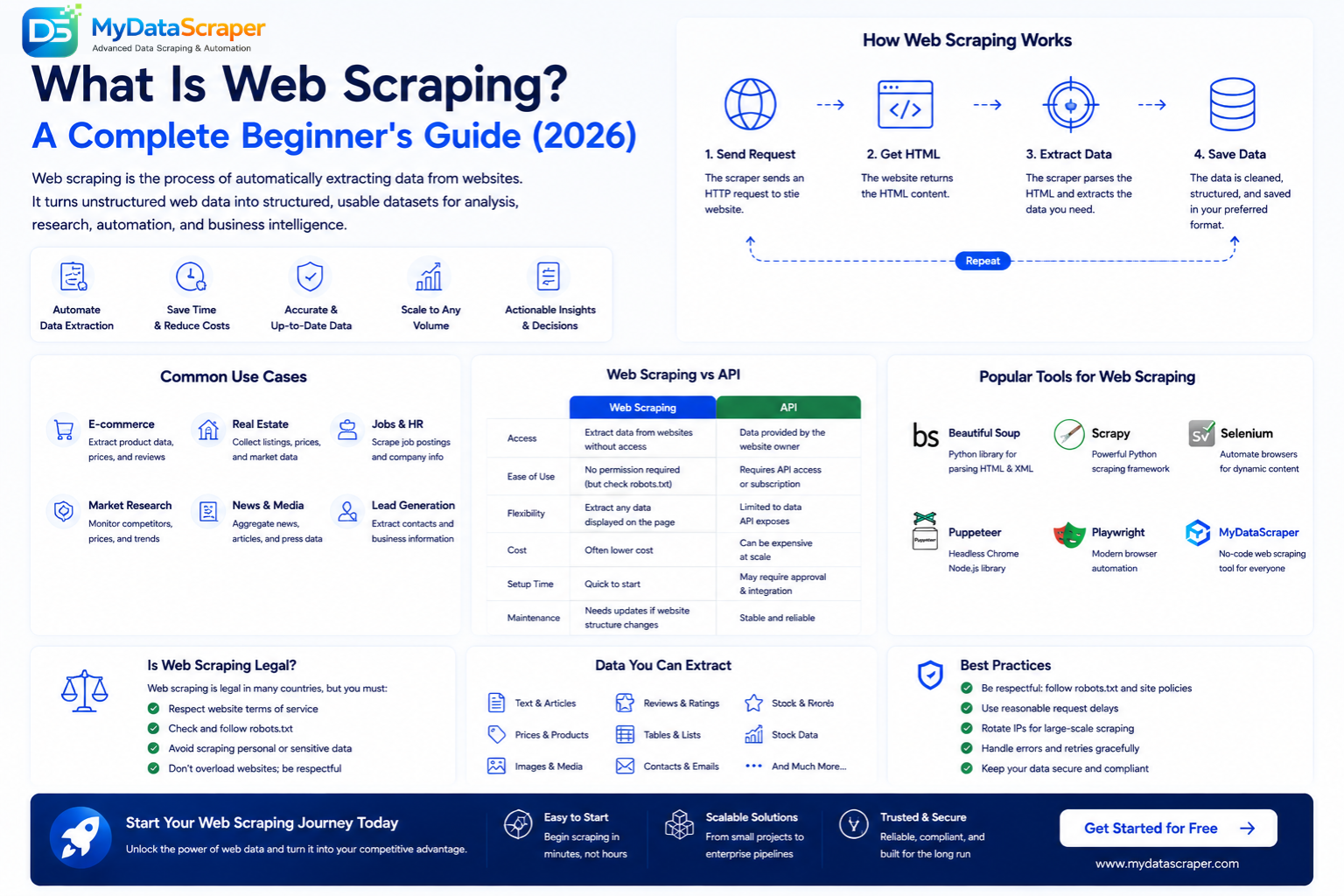
Every day, the internet produces roughly 2.5 quintillion bytes of data. Product prices change hourly on Amazon. New job listings appear every minute on LinkedIn. Real estate prices fluctuate across thousands of property portals. Behind every smart business decision — from competitor pricing strategy to market-entry analysis — there's data. And the fastest, most scalable way to collect that data from the open web is web scraping. Whether you're a marketer, a data analyst, an entrepreneur, or just curious, this guide will explain what web scraping is, how it works, and how you can use it — in plain, non-technical language.
What Is Web Scraping? — Simple Definition
Web scraping is the automated process of extracting data from websites. Instead of manually copying and pasting information from web pages, a web scraper — a piece of software — visits pages automatically, reads the content, and saves the specific data you need into a structured format like a spreadsheet, CSV file, or database.
Think of it this way: when you visit an Amazon product page, you see a product title, price, rating, images, and reviews. You could copy that information by hand. But if you need data from 10,000 products, doing it manually would take weeks. A web scraper does the same thing in hours — or even minutes — without errors, fatigue, or coffee breaks.
Web Scraping in One Sentence
Web scraping means using software to automatically collect data from websites at scale, converting unstructured web pages into structured, usable datasets.
Other terms people use for the same concept include: data scraping, web data extraction, web harvesting, screen scraping, and data mining (though data mining technically refers to analyzing data, not collecting it).
How Does Web Scraping Work? — Step by Step
At a high level, web scraping follows a simple 5-step process. Understanding these steps demystifies the entire concept, even if you never plan to build a scraper yourself.
1. Identify Target
Decide which website & data points you need
2. Send Request
Scraper sends HTTP requests to the website's server
3. Get HTML
Server returns the HTML source code of the page
4. Parse & Extract
Scraper reads the HTML and pulls out specific data fields
5. Store Data
Extracted data is saved as JSON, CSV, Excel, or into a database
A More Detailed Look at Each Step
Step 1: Identify the target. You start by deciding what data you need and from which website. For example: "I need product names, prices, and ratings from the top 500 laptops on Amazon India." You also identify the URL patterns — search result pages, category pages, or individual product pages.
Step 2: Send an HTTP request. Your scraper sends an HTTP GET request to the target URL — the same type of request your browser sends when you type a URL and hit Enter. The request includes headers like User-Agent (which identifies the browser type) to make it look like a regular browser visit.
Step 3: Receive the HTML response. The website's server processes your request and returns the HTML source code of the page. This is the raw code that browsers use to render the visual page you see. It contains all the text, links, images, and structure of the page.
Step 4: Parse and extract. The scraper uses parsing libraries (like BeautifulSoup in Python) to read through the HTML and find the specific elements that contain your target data. It uses CSS selectors, XPath, or other identifiers to pinpoint exactly where the product title, price, or rating is in the code — then extracts those values.
Step 5: Store the data. The extracted data is organized into rows and columns and saved in a structured format — JSON, CSV, Excel, or directly into a database. This is your clean, usable dataset.
What a Simple Web Scraper Looks Like in Python
# A basic web scraper in Python using Requests + BeautifulSoup
import requests
from bs4 import BeautifulSoup

# Step 1 & 2: Define target URL and send request
url = "https://books.toscrape.com/"
response = requests.get(url)

# Step 3 & 4: Parse HTML and extract book titles & prices
soup = BeautifulSoup(response.text, "html.parser")
books = soup.find_all("article", class_="product_pod")

for book in books:
    title = book.find("h3").find("a")["title"]
    price = book.find("p", class_="price_color").text
    print(f"{title} — {price}")

# Step 5: In production, you'd save this to CSV, JSON, or a database
This simple script visits a book catalog website, finds every book on the page, and prints each book's title and price. In a real project, you'd add pagination handling, error retries, proxy rotation, and data storage — but the core logic is always these five steps.
Web Scraping vs Web Crawling — What's the Difference?
People often confuse web scraping and web crawling (or web spidering). While they're related, they serve different purposes:
| Factor | Web Scraping | Web Crawling |
|---|---|---|
| Purpose | Extract specific data from pages | Discover and index pages |
| Focus | Data fields (prices, names, reviews) | URLs, links, page structure |
| Scope | Targeted — specific pages or sites | Broad — entire websites or the web |
| Output | Structured dataset (CSV, JSON) | List of URLs, sitemaps, page index |
| Example | Extract all laptop prices from Amazon | Google discovering new pages on the web |
| Who Uses It | Businesses, researchers, analysts | Search engines, SEO tools |
In practice, most web scraping projects involve both. First, a crawler discovers all the relevant URLs (e.g., all product page URLs in a category). Then, a scraper visits each URL and extracts the specific data. At MyDataScraper, our systems combine intelligent crawling with precision extraction to deliver complete datasets.
Why Do Businesses Use Web Scraping?
Web scraping has become a core capability for data-driven businesses across every industry. Here's why companies — from startups to Fortune 500 — invest in web scraping:
Top Use Cases by Industry
E-Commerce & Retail
Track competitor prices in real time, monitor product availability, optimize your pricing strategy, and track MAP (Minimum Advertised Price) compliance across marketplaces.
→ E-Commerce Scraping ServicesReal Estate & PropTech
Extract property listings, rental prices, agent details, and market trends from real estate portals. Power property valuation models and investment analysis.
→ Real Estate Scraping ServicesTravel & Hospitality
Monitor hotel rates, flight prices, and OTA listings across Booking.com, Expedia, MakeMyTrip, and more. Enable dynamic pricing and competitive rate intelligence.
→ Travel Scraping ServicesFood Delivery & Restaurants
Scrape menu items, prices, restaurant ratings, delivery times, and customer reviews from Zomato, Swiggy, UberEats. Power cloud kitchen intelligence and competitive analysis.
→ Food Delivery Scraping ServicesRecruitment & HR
Collect job listings, salary ranges, required skills, and company hiring trends from Indeed, LinkedIn, Naukri, and Glassdoor. Power workforce analytics and talent intelligence.
→ Job Listings Scraping ServicesSocial Media & Marketing
Track brand mentions, influencer metrics, engagement rates, sentiment analysis, and trending topics across social platforms. Drive content strategy with real data.
→ Social Media Scraping ServicesMarket Research & Consulting
Gather industry data, consumer trends, pricing intelligence, and competitive landscapes at scale. Replace expensive survey-based research with real-time web data.
→ Market Research ServicesFinance & Investment
Track company information, financial filings, news sentiment, product launches, and alternative data signals for investment decisions and risk analysis.
→ Data Insights & AnalyticsIs Web Scraping Legal in 2026?
This is the most common question about web scraping, and the answer is: yes, web scraping of publicly available data is generally legal — but there are nuances, boundaries, and best practices you should follow.
✅ Key Legal Precedents
Several landmark court cases have shaped the legal landscape for web scraping:
- hiQ Labs v. LinkedIn (2022, US 9th Circuit): The court ruled that scraping publicly available data does not violate the Computer Fraud and Abuse Act (CFAA). LinkedIn could not prevent hiQ from scraping public profiles. This is the most cited case supporting the legality of web scraping.
- Ryanair v. PR Aviation (2015, EU): The EU Court of Justice ruled that data from websites not protected by copyright or database rights can be freely extracted.
- Meta v. Bright Data (2024, US): A US judge ruled that scraping publicly viewable Facebook/Instagram data (data accessible without logging in) did not violate the CFAA or state contract law.
Best Practices for Ethical & Legal Scraping
Follow This Checklist for Responsible Web Scraping
At MyDataScraper, all our scraping operations follow ethical guidelines. We only extract publicly available data, implement respectful crawl rates, and comply with relevant data protection regulations.
Common Web Scraping Methods & Techniques
There are several approaches to web scraping, ranging from simple scripts to enterprise-grade platforms. Here are the most common methods:
HTTP Request + HTML Parsing
Send HTTP requests using libraries like Python's requests, then parse the HTML response with BeautifulSoup or lxml. Fast and lightweight — ideal for static websites.
- Best for: Static websites, blogs, directories
- Tools: Requests, BeautifulSoup, lxml, httpx
- Speed: ⚡ Very fast
Headless Browser Automation
Use a headless browser (Chrome/Firefox without the GUI) to fully render pages including JavaScript. Essential for modern single-page applications (SPAs) where data loads dynamically.
- Best for: JS-heavy sites, SPAs, infinite scroll
- Tools: Playwright, Puppeteer, Selenium
- Speed: 🐢 Slower (full rendering)
Scraping Framework
Use a full scraping framework that handles concurrency, scheduling, retries, and data pipelines. Scrapy (Python) is the industry standard for large-scale crawl-and-scrape operations.
- Best for: Large-scale projects, millions of pages
- Tools: Scrapy, Crawlee
- Speed: ⚡⚡ Fast with async
Scraping API / Managed Service
Use a service that handles everything — proxy management, anti-bot bypass, HTML parsing, data cleaning. You provide URLs or search queries; you receive clean JSON data. No coding or infrastructure needed.
- Best for: Business users, production applications
- Tools: MyDataScraper APIs, ScraperAPI
- Speed: ⚡ Fast (managed infrastructure)
No-Code Visual Scrapers
Point-and-click tools that let you visually select data fields on a webpage. The tool generates the scraping logic automatically. Good for non-developers and simple projects.
- Best for: Non-technical users, quick tasks
- Tools: Octoparse, ParseHub, Web Scraper (Chrome)
- Speed: 🔄 Moderate
API-Based Extraction
Some websites provide official APIs that let you request data in structured format (JSON/XML). Cleaner and more stable than scraping — but only available for a fraction of websites and with limited data fields.
- Best for: Platforms with public APIs
- Tools: REST clients, official SDKs
- Speed: ⚡⚡ Fastest
What Formats Does Scraped Data Come In?
Web scraping converts unstructured web page content into structured, machine-readable data. The most common output formats are:
CSV
Comma-separated values. Opens in Excel, Google Sheets. Best for tabular data.
JSON
JavaScript Object Notation. Best for APIs, nested data, and web applications.
Excel (XLSX)
Microsoft Excel format. Preferred by business analysts and reporting teams.
Database
Direct insert into MySQL, PostgreSQL, MongoDB. Best for production systems.
API Endpoint
Live API that returns fresh data on demand. Best for real-time integrations.
Dashboard
Visual analytics dashboard built on scraped data. Best for monitoring & reporting.
At MyDataScraper, we deliver data in any format you need — from raw CSV files to live API endpoints to interactive dashboards.
Challenges of Web Scraping
Web scraping isn't always straightforward. Websites actively try to prevent automated access, and the technical challenges increase with scale. Here are the most common obstacles:
🛡️ Anti-Bot Systems
Websites use services like Cloudflare, Akamai, DataDome, and PerimeterX to detect and block bots. These systems analyze request patterns, browser fingerprints, and behavioral signals.
🧩 CAPTCHAs
CAPTCHA challenges (reCAPTCHA, hCaptcha, image puzzles) are designed to distinguish humans from bots. Solving them at scale requires CAPTCHA-solving services or advanced browser automation.
⚡ JavaScript Rendering
Modern websites load content dynamically via JavaScript frameworks (React, Vue, Angular). Simple HTTP requests won't capture this data — you need headless browsers or API interception.
🔄 Frequent Layout Changes
Websites regularly update their design, CSS classes, and HTML structure. Every change can break your scraper's selectors, requiring ongoing maintenance.
🌍 Geo-Restrictions
Many sites serve different content based on the visitor's location (IP-based geo-targeting). Accurate scraping may require proxies in specific countries or regions.
📉 Rate Limiting & IP Blocking
Too many requests from a single IP address triggers rate limits or permanent bans. Proxy rotation with residential or datacenter IPs is essential for scraping at scale.
🗃️ Data Quality
Raw scraped data often contains duplicates, missing fields, encoding errors, and format inconsistencies. Post-scraping data cleaning and validation is a critical step.
⚖️ Legal & Ethical Compliance
Navigating terms of service, data protection laws (GDPR, CCPA), and ethical boundaries requires careful planning, especially when scraping at enterprise scale.
This is exactly why many businesses choose a managed web scraping service instead of building and maintaining scrapers in-house. A service like MyDataScraper handles all these challenges — proxies, anti-bot bypass, rendering, cleaning, and delivery — so you just receive clean data.
Web Scraping vs API — When to Use Which?
If a website offers a public API (Application Programming Interface), you might wonder: should I use the API or scrape the site? Here's a quick breakdown:
| Factor | Web Scraping | API |
|---|---|---|
| Availability | Works on any public website | Only if API exists |
| Data Coverage | Everything visible on the page | Limited to exposed endpoints |
| Data Format | Requires parsing (HTML → structured) | Structured (JSON/XML) by default |
| Maintenance | High (selectors break) | Low (stable endpoints) |
| Scale | Unlimited (with infrastructure) | Limited by rate quotas |
| Best For | Competitor data, comprehensive extraction | Quick integrations, stable data feeds |
The bottom line: Most websites — especially competitors — don't offer public APIs. And even when they do, APIs rarely expose all the data visible on the page. Web scraping gives you complete access to any public data on the internet. For a deeper comparison, read our Web Scraping vs API guide.
How to Get Started with Web Scraping
Depending on your technical background and goals, there are different paths to start extracting web data:
Path 1: Learn to Code (DIY Approach)
If you're a developer or want to learn, Python is the best language for web scraping. Here's a recommended learning path:
- Learn Python basics (variables, loops, functions, libraries)
- Learn the
requestslibrary for making HTTP requests - Learn
BeautifulSoupfor parsing HTML - Practice on beginner-friendly sites like
books.toscrape.comorquotes.toscrape.com - Learn CSS selectors and XPath for precise element targeting
- Graduate to
Scrapyfor large-scale projects - Learn
PlaywrightorSeleniumfor JavaScript-heavy sites
Path 2: Use a No-Code Tool
If you don't code, use visual scraping tools like Octoparse or ParseHub. You point and click on the data you want, and the tool handles the rest. Good for simple, small-scale extraction.
Path 3: Use a Managed Scraping Service (Recommended)
If you need reliable data at scale without managing infrastructure, a managed service is the most practical option. You tell the service what data you need — they build, run, and maintain the scrapers. You receive clean data via API, CSV, or dashboard.
How MyDataScraper Makes Web Scraping Easy
Whether you need data from one website or a hundred, MyDataScraper handles the entire data extraction pipeline — from crawling to cleaning to delivery.
Everything You Need, Zero Complexity
We've helped hundreds of businesses extract actionable data from the web. Here's what we offer:
Custom Web Scraping
We build and maintain scrapers for any website. You define the data — we deliver it.
Live Scraping APIs
Send a URL, get clean JSON back. Real-time data extraction via simple API calls.
Ready-Made Datasets
Pre-collected datasets from e-commerce, real estate, food delivery, travel & more.
Analytics Dashboards
Visual dashboards built on top of your scraped data. Monitor trends, prices & competitors.
Scheduled Scraping
Automated daily, weekly, or hourly data delivery. Set it and forget it.
Data Cleaning
We clean, deduplicate, validate, and structure raw data before delivery.
Web Scraping Glossary — Key Terms Explained
| Term | Meaning |
|---|---|
| HTML | HyperText Markup Language — the code that structures every web page |
| CSS Selector | A pattern used to target specific HTML elements (e.g., .price, #title) |
| XPath | A query language for selecting nodes in an XML/HTML document |
| HTTP Request | A message sent to a web server asking for a page's content |
| Proxy | An intermediary server that masks your IP address during scraping |
| Headless Browser | A browser without a visual interface, used for rendering JavaScript |
| Rate Limiting | A server's mechanism to restrict how many requests you can make per time period |
| CAPTCHA | A challenge-response test designed to distinguish humans from bots |
| Robots.txt | A file on websites that tells crawlers which pages they can or cannot access |
| JSON | JavaScript Object Notation — a lightweight data format used in APIs |
| Pagination | The splitting of results across multiple pages (page 1, page 2, etc.) |
| Anti-Bot | Technologies used by websites to detect and block automated scraping |
Frequently Asked Questions About Web Scraping
Ready to Extract Data From Any Website?
Whether you need product prices, job listings, property data, or competitive intelligence — we build, run, and maintain the scrapers. You get clean, structured data delivered exactly how you want it.