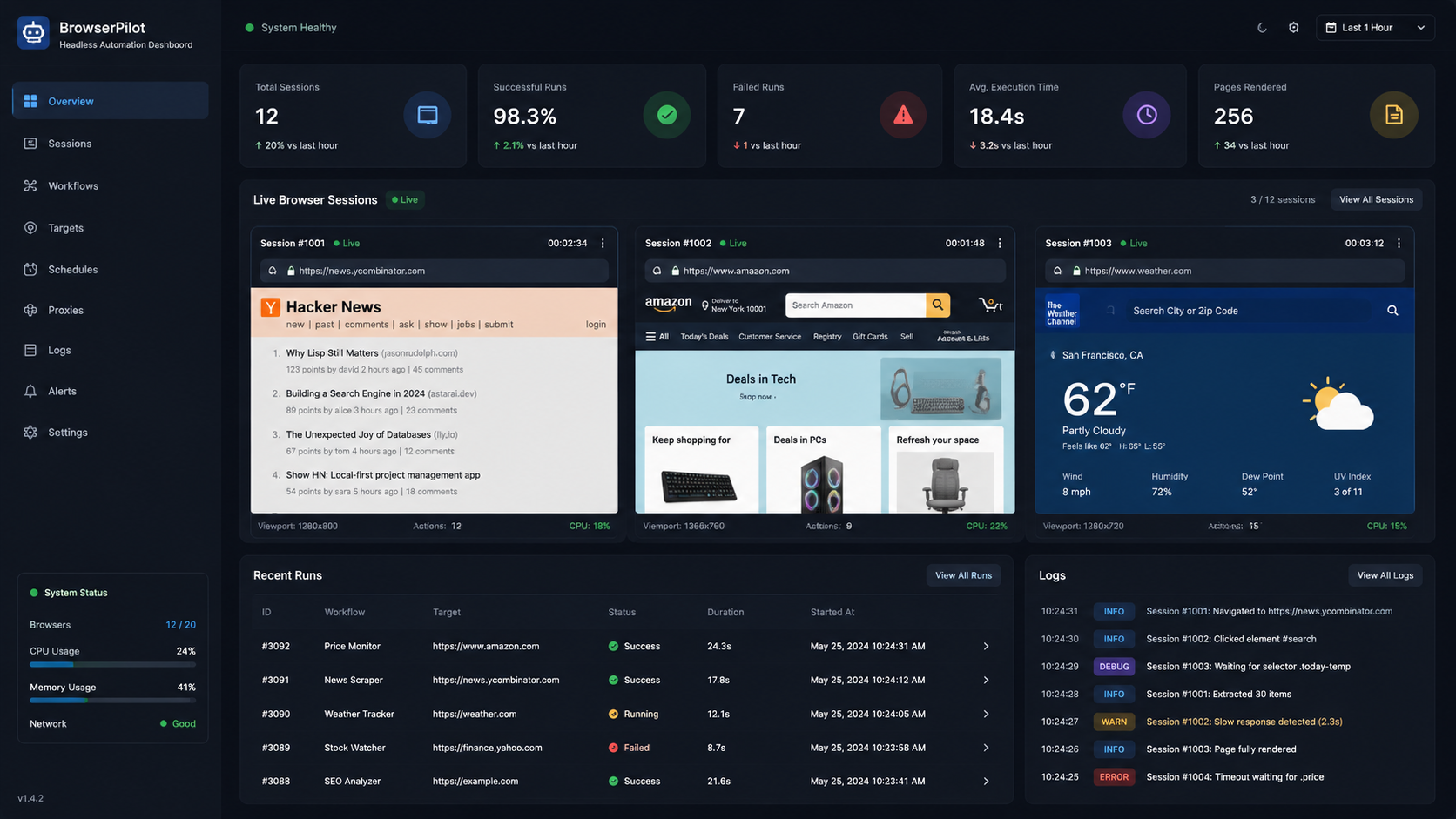
Modern websites are no longer simple HTML pages.
Open almost any eCommerce store, travel platform, grocery app, or social media website today, and you’ll notice something immediately:
👉 Content loads dynamically.
👉 Buttons trigger JavaScript events.
👉 Infinite scrolling replaces pagination.
👉 APIs hide behind browser interactions.
For traditional scrapers, this creates a serious challenge.
A simple HTTP request often won’t capture:
- Product listings
- Prices
- Reviews
- Dynamic inventory data
- User-triggered content
That’s why headless browser scraping has become one of the most important techniques in modern data extraction.
And among the available tools, Playwright has quickly emerged as one of the most powerful solutions for browser automation and scraping.
In this guide, we’ll walk through:
- What headless browser scraping actually is
- Why developers are moving toward Playwright
- How to build a Playwright scraper using Python
- How to handle dynamic websites
- Anti-bot considerations
- Best practices for scaling scraping systems
Whether you’re extracting eCommerce data, monitoring prices, or building a real-time web scraping solution, this guide will give you a strong practical foundation.
What Is Headless Browser Scraping?
Traditional scrapers work by:
- Sending an HTTP request
- Downloading HTML
- Parsing the content
That works fine for static websites.
But modern websites often rely heavily on JavaScript.
This means:
- Content loads after page render
- APIs trigger dynamically
- Elements appear only after user interaction
A headless browser solves this by:
👉 Simulating a real browser environment.
What “Headless” Means
A headless browser runs:
- Without a visible graphical interface
But internally, it behaves like:
- Chrome
- Chromium
- Firefox
- WebKit
Why This Matters
Headless browsers can:
- Execute JavaScript
- Click buttons
- Scroll pages
- Fill forms
- Wait for elements
- Interact like real users
This makes them ideal for:
- Dynamic web scraping
- Browser automation
- SPA (Single Page Application) scraping
Why Developers Are Choosing Playwright
For years, Selenium dominated browser automation.
But Playwright has gained major adoption because it’s:
- Faster
- More modern
- Better suited for dynamic applications
Key Advantages of Playwright
1. Multi-Browser Support
Supports:
- Chromium
- Firefox
- WebKit
2. Excellent JavaScript Handling
Modern websites rely heavily on JS rendering.
Playwright handles this extremely well.
3. Built-In Auto Waiting
Instead of manually waiting for elements:
👉 Playwright intelligently waits automatically.
4. Better Reliability
Fewer flaky scripts compared to older automation frameworks.
5. Strong Async Support
Excellent for scalable concurrent scraping workflows.
If you’re comparing tools for browser automation frameworks, Playwright is now one of the top choices for modern scraping pipelines.
Setting Up Playwright with Python
Let’s build a scraper step by step.
Step 1: Install Playwright
Install the library:
pip install playwrightThen install browser binaries:
playwright installStep 2: Launch Your First Browser
Here’s a simple Playwright script.
from playwright.sync_api import sync_playwright

with sync_playwright() as p:
    browser = p.chromium.launch(headless=True)

    page = browser.new_page()
    page.goto("https://example.com")

    print(page.title())

    browser.close()
What’s Happening Here?
- Launches Chromium
- Opens a new browser page
- Visits a website
- Prints the page title
Simple—but powerful.
Understanding Headless vs Headed Mode
You can run Playwright in:
- Headless mode
- Headed mode (visible browser)
Headless Mode
browser = p.chromium.launch(headless=True)Fast and efficient.
Headed Mode
browser = p.chromium.launch(headless=False)Useful for:
- Debugging
- Watching interactions
Scraping Dynamic Content
Now let’s move beyond static pages.
Modern websites often load content asynchronously.
Example: Extracting Product Titles
from playwright.sync_api import sync_playwright

with sync_playwright() as p:
    browser = p.chromium.launch(headless=True)

    page = browser.new_page()
    page.goto("https://example.com/products")

    page.wait_for_selector(".product-title")

    products = page.query_selector_all(".product-title")

    for product in products:
        print(product.inner_text())

    browser.close()
Why wait_for_selector() Matters
Without waiting:
👉 The scraper may run before content loads.
Playwright helps synchronize rendering and extraction.
Handling Infinite Scroll
Many modern sites use:
👉 Infinite scrolling instead of pagination.
You can automate scrolling like this:
page.evaluate("""
    window.scrollTo(0, document.body.scrollHeight)
""")
Better Approach
Loop scrolling until:
- No new content appears
This is common in:
- Social feeds
- Product listings
- Marketplace platforms
Clicking Buttons & Interacting with Pages
You can automate user interactions easily.
Example: Clicking “Load More”
page.click(".load-more-button")Example: Filling Search Forms
page.fill("#search", "laptop")
page.press("#search", "Enter")
This becomes extremely useful for:
- Search-driven websites
- Dynamic filtering systems
- Product discovery workflows
especially in eCommerce data scraping projects.
Taking Screenshots
Playwright also supports screenshots.
page.screenshot(path="page.png")Useful for:
- Debugging
- Visual verification
- Monitoring rendering issues
Extracting Structured Data
Let’s extract:
- Product title
- Price
- Rating
products = page.query_selector_all(".product-card")

for item in products:
    title = item.query_selector(".title").inner_text()
    price = item.query_selector(".price").inner_text()

    print(title, price)
Handling Anti-Bot Detection
This is where things get interesting.
Modern websites actively detect automation.
Common Detection Methods
- Browser fingerprinting
- Headless detection
- Request behavior analysis
- Rate limiting
Best Practices to Reduce Detection
Use Realistic User Agents
page = browser.new_page(
    user_agent="Mozilla/5.0 ..."
)
Add Delays Between Actions
Avoid robotic behavior.
Rotate IP Addresses
Helps reduce blocking risk.
Avoid Excessive Concurrency
Too many requests trigger suspicion.
If you’re researching anti-bot scraping techniques, Playwright offers strong flexibility for realistic browser simulation.
Async Playwright for High-Speed Scraping
One major advantage of Playwright:
👉 Excellent async support.
Example Async Workflow
import asyncio
from playwright.async_api import async_playwright

async def main():
    async with async_playwright() as p:
        browser = await p.chromium.launch()

        page = await browser.new_page()
        await page.goto("https://example.com")

        print(await page.title())

        await browser.close()

asyncio.run(main())
Why Async Matters
Async scraping enables:
- Concurrent page handling
- Faster extraction
- Better scalability
especially for high-speed Python scraping systems.
Real-World Use Cases
1. eCommerce Data Scraping
Extract:
- Prices
- Reviews
- Product availability
2. Travel Fare Monitoring
Track:
- Hotel prices
- Airline fares
- Dynamic booking changes
3. Grocery Delivery Intelligence
Monitor:
- Real-time inventory
- Hyperlocal pricing
- Promotions
4. SEO & SERP Monitoring
Extract:
- Search rankings
- Ads
- Featured snippets
Image Placeholder
Image Alt: Developer monitoring Playwright headless browser scraping dashboard with dynamic website data extraction
Common Challenges Developers Face
Even powerful tools like Playwright come with challenges.
1. Memory Usage
Browser automation consumes more resources than lightweight scrapers.
2. Scaling Infrastructure
Running hundreds of browser instances requires optimization.
3. Dynamic Site Changes
Websites constantly update layouts and selectors.
4. Anti-Bot Systems
Large-scale scraping still requires careful infrastructure design.
Best Practices for Production Scraping
Use Browser Contexts
Instead of launching multiple browsers:
👉 Reuse contexts efficiently.
Close Pages Properly
Avoid memory leaks.
Implement Retry Logic
Network failures happen.
Monitor Selector Failures
Dynamic sites change frequently.
Use Structured Logging
Track:
- Errors
- Timeouts
- Failed pages
Playwright vs Selenium: Quick Comparison
| Feature | Playwright | Selenium |
|---|---|---|
| Speed | Faster | Slower |
| Auto Waiting | Built-in | Manual |
| Async Support | Excellent | Limited |
| Modern JS Apps | Better | Good |
| Multi-Browser | Yes | Yes |
The Industry Shift
Many modern scraping teams are moving toward:
👉 Playwright + async Python architectures
for scalable browser automation.
How MyDataScraper Can Help
Building browser automation pipelines sounds exciting initially.
But at scale, things become complicated quickly:
- Anti-bot systems evolve constantly
- Dynamic websites break selectors
- Infrastructure costs increase
- Browser orchestration becomes difficult
This is where MyDataScraper helps businesses build reliable, scalable scraping systems.
What MyDataScraper Provides
- Playwright-powered scraping solutions
- Dynamic website extraction pipelines
- Anti-bot handling infrastructure
- Scalable browser automation systems
- Clean structured datasets ready for analysis
The Business Advantage
Instead of managing:
- Browser crashes
- Proxy rotation
- Selector maintenance
You can focus on:
👉 Insights, analytics, and business decisions.
The Future of Headless Browser Scraping
The next generation of scraping systems will increasingly rely on:
- AI-assisted extraction
- Browser fingerprint management
- Distributed scraping architectures
- Real-time rendering intelligence
And browser automation tools like Playwright will continue playing a central role.
Final Thoughts
Headless browser scraping has become essential for modern web data extraction.
Because today’s websites are:
- Dynamic
- Interactive
- JavaScript-driven
And traditional scrapers simply can’t keep up.
Using Playwright with Python gives developers:
- Speed
- Reliability
- Flexibility
- Scalability
for extracting data from even the most dynamic platforms.
Whether you’re building:
- eCommerce intelligence systems
- Real-time pricing trackers
- Competitive monitoring pipelines
headless browser scraping is now a foundational skill in modern data engineering.
Need Help Building Scalable Browser Automation Pipelines?
If you’re looking to scrape dynamic websites, automate browser interactions, or build scalable Playwright scraping systems:
👉 Visit: https://www.mydatascraper.com/contact-us/
Let’s build a fast, scalable, and reliable web scraping infrastructure for your business 🚀